Stop retrying uploads. Fix them where they fail.
“JPG or PNG only, max 5 MB” meets its match. The Fylane extension repairs the file inside the form that rejected it — converted, resized, compressed, validated — and puts it back as if you had picked the right file all along.
free · no account needed · nothing leaves your device without you
Fix it once. Every form after that is one tap.
When a file is fixed, the extension offers to keep it. The next site that wants a résumé, a cover letter and a photo shows one card offering all three — each refitted to what that site accepts, before it goes in. They are kept encrypted in your own browser, on this device: nothing is uploaded to hold them, and nothing is sent anywhere to fill a form. Lock them behind Touch ID and even this device cannot read them until you say so.
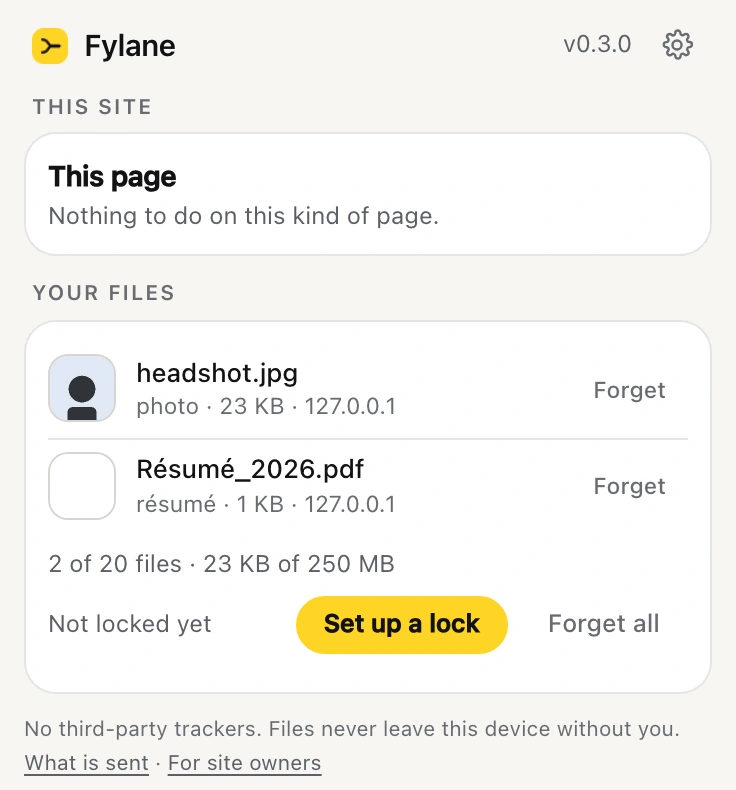
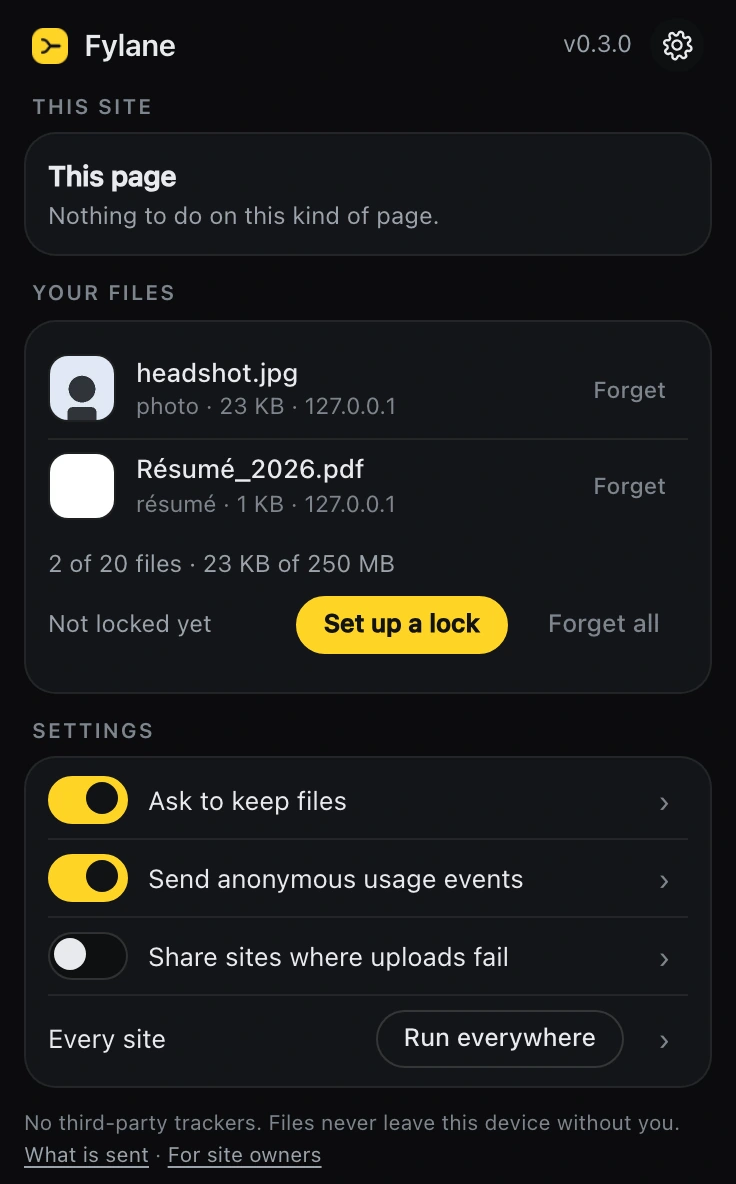
Everything it does, on one screen.
It opens on the two things that change: what Fylane can do on the page you are looking at, and the files you have kept. The switches are set once and then they are furniture, so they wait behind the gear — and each one tells you exactly what it sends before you turn it on. The two that leave your device are yours to turn on, not ours. It takes the theme of the browser around it.
Helpful is a discipline.
Silent until it matters
No popups, no badges, no nagging. Fylane only appears when a form actually rejects your file — and a valid file passes through untouched.
Reads the form’s own rules
The accept attribute, the page’s stated limits, even the site’s own rejection message — Fylane learns what each form wants and says where every rule came from.
Private by construction
Images convert, resize and compress on your device. Documents use Fylane Cloud only after a consent card names the file and the exact moment it uploads. No analytics, ever.
Your whole selection, kept
Pick five photos where two are oversized and Fylane fixes the two — the full selection lands in the form, in order, or nothing is touched at all.
Your files, remembered once
Keep a résumé, a headshot or an ID scan once, with a tap, and the next form that asks for it gets one card: every matching field filled from your files, each fitted to that form’s rules, placed only when you say so. Encrypted on your device; Touch ID or a passphrase locks it; ID documents are locked by default. The Touch ID step runs on fylane.dev/extension/unlock, a page that fetches nothing and hands the passkey’s secret only to the extension in your browser.
On your device first. In the cloud only with your consent.
On your device, always free
Image conversion, resizing and compression run in the browser. Nothing leaves your machine and nothing is metered.
inspect
What the file actually is — measured, not declared.
image.convert
Re-encode to WebP, JPEG, PNG or AVIF at your quality.
image.resize
Resize to your dimensions — inside, cover or fill; never enlarged. Answers WebP unless `format` says otherwise.
convert
Documents into another document format: Office, text and HTML to PDF by default, or by `to` into docx, odt, rtf, txt, html, xlsx, ods, csv, pptx, odp, md or epub (Markdown and EPUB through pandoc). Images to WebP.
pdf.compress
Structure-level recompression and linearization.
image.to-pdf
One or more images become one PDF, a page per image at its own size.
pdf.render
Pages to PNG, JPEG or WebP.
thumbnail
What it looks like: images resize, PDFs and Office render page one, videos give a frame.
The cloud list above is the relay's own allowlist, rendered from the same array it enforces. Ten cloud fixes a day per connection are free without an account; sign in for 500 credits a month.
Green means the form agrees.
Fylane never claims success on faith: the fixed file is validated against the form’s rules and placed into the input itself — the same file the site receives when you submit.
What people ask before they install it
What does “autofill with résumé” mean?
On a job board it means the site will read your uploaded résumé and try to fill in the name, email, work history and education fields for you, so you do not retype what is already in the document. It is a guess made from your file, and it is often wrong about dates and job titles, so read what it filled in before you submit. It does not fill in the upload fields themselves — you still attach every file by hand. That last part is what the Fylane extension does: one tap fills the résumé, cover letter and photo fields from files you kept once, each refitted to what that site accepts.
What does “attach résumé” mean on an application?
It means upload the file itself, rather than typing your history into the form. The site stores the document and passes it to whoever reviews the application. Send a PDF unless the form asks for Word, keep it under a megabyte, and give it a plain file name with your own name in it.
Why will my file not upload?
Almost always one of four things: the file is bigger than the form allows, the form takes only certain formats and yours is not one of them, the image is the wrong shape or resolution for what the form demands, or the file is open in another program and locked. The extension reads the form’s own rules, tells you which one you have hit, and fixes it in place.
Is the extension free?
Yes. Image work — converting, resizing, compressing, cropping — happens on your own device and is not metered at all. Document conversions that need the cloud run on a free daily share, and the card names the file and the moment it uploads before anything leaves your machine.
Can it see everything I do online?
No. It runs only on sites you turn it on for, one at a time, and it looks at upload fields rather than page content. Your files are held encrypted in your own browser and are never uploaded to keep them. There is no analytics of any kind.
Which browsers does it work in?
Chrome, and the browsers built on it — Edge, Brave, Arc, Opera. It installs from the Chrome Web Store.